Every entrepreneur, startup founder, or product manager planning an app in 2026 lands on the same question early on: what will this actually cost me? This comprehensive guide gives you real answers — broken down by app type, platform, team, features, and timelines.
The honest answer is that there is no single universal price. What you pay depends on what you're building (scope and feature depth), how you're building it (platform choice and architecture), and who is building it (team location, seniority, and workflow maturity). A lean MVP and an enterprise AI platform can sit at completely opposite ends of the pricing spectrum.
This guide takes you through all the variables, gives you transparent cost ranges, and equips you to plan your app budget with confidence — no guesswork, no mid-project budget shocks.
Quick Answer: What Does App Development Cost in 2026?
Here is a practical snapshot of mobile app development pricing in 2026, organized by project complexity. These figures assume professional development (not a no-code tool) and cover the core build including UI/UX design, backend engineering, and quality assurance.
Basic UI, minimal screens, little to no backend logic, no complex integrations
User authentication, payment processing, third-party APIs, admin dashboard
Real-time data, advanced integrations, scalable cloud infrastructure
Regulatory compliance, big data pipelines, AI/ML workflows, high security
Key takeaway: App development costs in 2026 can start comfortably in the five-figure range for straightforward products, but scale rapidly into six or seven figures as feature depth, compliance requirements, and infrastructure demands grow.
Cost by App Category: Your Product Type Changes Everything
Different categories of apps come with fundamentally different engineering challenges, security obligations, and scalability demands. That is why two apps with similar screen counts can carry very different price tags — the underlying complexity varies enormously depending on the industry and use case.
| App Category | Core Features Required | Estimated Cost (USD) |
|---|---|---|
| Basic Utility App | Simple interface, limited screens, local data storage, minimal server-side logic | $15,000 – $60,000 |
| Marketplace / Platform App | Dual user roles (buyer/seller), payment gateway, listings, ratings, admin panel | $80,000 – $300,000+ |
| On-Demand Service App | Booking system, live GPS tracking, driver dispatch logic, push notifications | $100,000 – $350,000+ |
| Social Networking App | User profiles, activity feeds, in-app messaging, media uploads, content moderation | $150,000 – $500,000+ |
| Fintech App | KYC verification, encrypted transactions, compliance frameworks, fraud detection | $200,000 – $1,000,000+ |
| Healthcare App | HIPAA-compliant data handling, audit trails, role-based access, regulatory certifications | $200,000 – $1,000,000+ |
| AI-Powered App | Machine learning models, training pipelines, personalization engines, automation workflows | $200,000 – $1,000,000+ |
Why certain categories cost significantly more
Applications operating in fintech, healthcare, and AI spaces must invest heavily in security architecture, data governance, regulatory compliance, and infrastructure redundancy. These are not optional add-ons — they are foundational requirements that drive engineering hours and thus total cost well beyond simpler consumer utility apps.
Not Sure Where Your App Falls?
Get a clear picture of your feature scope, platform requirements, and realistic budget before you commit to development.
Plan My App Budget →iOS vs Android vs Cross-Platform: Which Path Costs More?
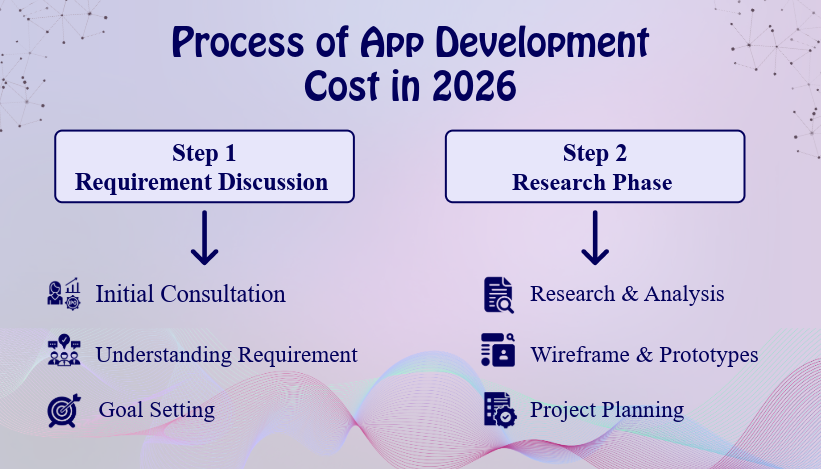
One of the most consequential decisions you will make early in the planning process is which platform strategy to adopt. This single choice ripples across your initial build cost, long-term maintenance budget, speed to market, and the flexibility you have in adding features over time.
| Approach | Codebases | Cost Range (USD) | Time to Market | Best Suited For |
|---|---|---|---|---|
| Native iOS Only | 1 | $30K – $150K | Medium | iOS-first audiences, premium UX products |
| Native Android Only | 1 | $30K – $150K | Medium | Android-dominant markets |
| Native iOS + Android | 2 | $120K – $300K+ | Slowest | Enterprise apps, performance-critical products |
| Cross-Platform (Flutter / React Native) | 1 | $50K – $250K | Fast | MVPs, SaaS tools, marketplaces |
| Single-Platform MVP First | 1 | $25K – $80K | Fastest | Budget-limited validation and early traction |
Option A: Full Native Development (iOS + Android)
Building natively means producing two entirely separate applications — one written in Swift/Objective-C for Apple devices and another in Kotlin/Java for Android. Each codebase is independently maintained, tested, and deployed.
Why native dual-platform development costs the most
Every feature must be engineered, reviewed, tested, and shipped twice. You typically need two specialist developer teams with distinct skill sets, and OS updates or bug fixes must be handled separately on each platform. This doubles the effort — and the invoice.
✅ Advantages
- Highest performance and responsiveness
- Pixel-perfect adherence to platform design guidelines
- Full access to native hardware (camera, Bluetooth, sensors)
- Best fit for AR/VR, real-time processing, complex animations
❌ Trade-offs
- Highest upfront and ongoing development cost
- Longer build timelines
- Separate QA cycles increase release overhead
- Two independent maintenance tracks
More expensive than single-platform builds
Starting range for combined native iOS + Android
Upper end for medium-complexity native dual build
Option B: Cross-Platform Development (Flutter or React Native)
Cross-platform frameworks allow developers to write a single shared codebase that compiles and runs natively on both iOS and Android. By 2026, this approach has matured to the point where it is the go-to choice for the majority of commercial apps — startups, SaaS platforms, and internal enterprise tools alike.
Why cross-platform is more cost-effective
Core application logic is written once, UI components are largely reusable, and a smaller team can manage both platforms. Quality assurance cycles are shorter since there is only one codebase to test. This translates directly into lower development costs and faster launch windows.
✅ Advantages
- One codebase covers both iOS and Android
- 20–40% cost savings over fully native builds
- Faster development and market entry
- Simpler long-term updates and feature additions
- Strong performance for most business and consumer apps
❌ Trade-offs
- Some edge-case platform-specific features may need custom native modules
- Slightly less flexibility for very hardware-intensive UX scenarios
- Not always ideal for extremely high-performance graphics workloads
| App Complexity | Cross-Platform Estimated Cost (USD) |
|---|---|
| Simple / Lean MVP | $25,000 – $60,000 |
| Medium Feature Set | $50,000 – $120,000 |
| Complex / Feature-Rich | $120,000 – $250,000 |
Option C: Single-Platform MVP Strategy
If budget constraints are real or speed of validation is the priority, launching on one platform first is a sound approach. It is the most common strategy among early-stage startups testing product-market fit.
When it makes sense: Your audience skews clearly toward iOS or Android, you need user feedback before locking in features, or you want to conserve capital during early traction-building. Expanding to the second platform later typically adds 50–70% of the original build cost.
Which Platform Strategy Is Right for You in 2026?
- Choose full native when performance, device hardware access, and platform polish are business-critical requirements.
- Choose cross-platform when you need a cost-efficient path to both platforms without sacrificing product quality.
- Choose single-platform first when validating an idea, launching an MVP, or operating under a defined budget ceiling.
App Development Cost by Team Location
Beyond platform decisions and app complexity, one of the most powerful variables controlling your total cost is where your development team is based. Hourly developer rates fluctuate significantly across geographies due to differences in cost of living, talent supply, market maturity, and local demand for technical skills.
In 2026, many product teams adopt a distributed or hybrid model — combining senior strategic oversight from one region with execution from a cost-efficient market — to optimize both quality and budget.
| Region | Typical Hourly Rate (USD) | What You Can Expect |
|---|---|---|
| North America (USA / Canada) | $100 – $220 | Top-tier seniority, strong product culture, high process maturity |
| Western Europe (UK, Germany, France) | $80 – $180 | Premium quality, robust engineering practices, slightly lower than US rates |
| Eastern Europe (Poland, Ukraine, Romania) | $40 – $90 | Strong technical talent, solid English proficiency, growing portfolio of global work |
| Latin America (Brazil, Colombia, Argentina) | $30 – $70 | Cost-effective nearshore option with compatible time zones for US-based companies |
| South Asia (India, Pakistan, Bangladesh) | $15 – $50 | Large talent pool, wide skill range, very competitive pricing for quality work |
| Southeast Asia (Philippines, Vietnam, Indonesia) | $20 – $55 | Growing technical expertise, competitive rates, increasing enterprise-grade delivery |
⚠️ Important note: Lower hourly rates do not automatically mean lower total project cost. A less experienced team working slowly with poor communication can easily exceed the budget of a senior team that executes efficiently. Evaluate total value delivered, not just the hourly number.
Cost Estimation Based on Features and Integrations
Features are the most granular driver of cost. Every capability you add to your app requires design work, engineering effort, testing, and sometimes third-party licensing. Understanding what individual features cost gives you the ability to scope and prioritize intelligently before committing budget.
| Feature / Functionality | Estimated Development Hours | Approx. Cost Range (USD) |
|---|---|---|
| User Registration & Authentication | 20 – 60 hrs | $1,500 – $6,000 |
| Social Login (Google, Apple, Facebook) | 15 – 30 hrs | $1,000 – $3,500 |
| Push Notifications | 15 – 35 hrs | $1,200 – $4,000 |
| In-App Payment Integration | 30 – 80 hrs | $2,500 – $9,000 |
| Geolocation & Maps | 25 – 70 hrs | $2,000 – $8,000 |
| Real-Time Chat / Messaging | 40 – 100 hrs | $4,000 – $12,000 |
| Audio / Video Calling | 50 – 130 hrs | $5,000 – $15,000 |
| Admin Dashboard & CMS | 40 – 100 hrs | $3,500 – $12,000 |
| Search, Filters & Sorting | 20 – 50 hrs | $1,500 – $6,000 |
| AI / ML Feature Integration | 60 – 200+ hrs | $6,000 – $30,000+ |
| Third-Party API Integration (per API) | 10 – 40 hrs | $800 – $5,000 |
| Multi-Language / Localization | 20 – 50 hrs | $1,500 – $6,000 |
These ranges assume mid-level developers at approximately $50–80/hr. Costs adjust proportionally based on your team's location and seniority level.
App Development Cost Breakdown: Where Does Your Money Actually Go?
Understanding the composition of your budget — not just the total — helps you allocate wisely and identify where cost optimization is possible without sacrificing product quality.
| Development Phase | % of Total Budget | What's Included |
|---|---|---|
| Discovery & Planning | 5 – 10% | Requirements analysis, technical architecture, project roadmap, wireframing |
| UI/UX Design | 15 – 25% | User research, information architecture, visual design, interactive prototypes |
| Frontend Development | 20 – 30% | UI screens, navigation, animations, client-side logic |
| Backend & API Development | 20 – 35% | Server-side logic, database design, REST/GraphQL APIs, authentication, business rules |
| Third-Party Integrations | 5 – 15% | Payment gateways, mapping services, analytics platforms, messaging APIs |
| Quality Assurance & Testing | 10 – 20% | Functional testing, performance testing, security audits, device compatibility |
| Deployment & Launch Preparation | 5 – 10% | App Store / Play Store submission, CI/CD pipelines, production environment setup |
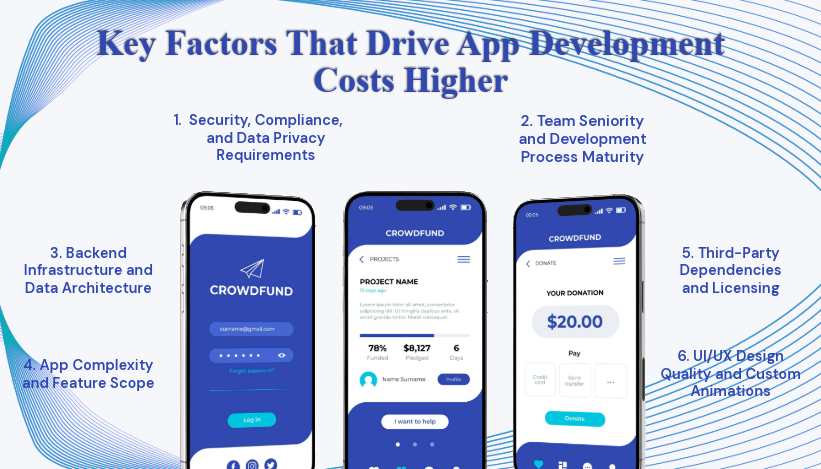
Key Factors That Drive App Development Costs Higher
Beyond features and platforms, a range of strategic and technical decisions can significantly shift your final development price. Being aware of these variables early allows you to make deliberate trade-offs rather than getting surprised later.
1. App Complexity and Feature Scope
This is the single biggest cost variable. Every additional feature, user role, or integration multiplies engineering and testing time. The more detailed your product specification, the more accurately you can estimate — and the less room there is for scope creep to inflate your budget.
2. UI/UX Design Quality and Custom Animations
A template-based interface built quickly costs far less than a carefully crafted, brand-consistent design system with custom micro-interactions. Investing in premium design is worthwhile for consumer-facing products where first impressions drive adoption and retention.
3. Backend Infrastructure and Data Architecture
Apps that need to handle large user volumes, real-time data synchronization, or complex relational data models require significantly more backend engineering. Cloud architecture choices — serverless vs containerized, SQL vs NoSQL — also have cost implications.
4. Security, Compliance, and Data Privacy Requirements
HIPAA compliance for healthcare, PCI-DSS certification for payment handling, GDPR readiness for European users — these are not checkbox exercises. They require dedicated engineering effort, audit mechanisms, encryption at rest and in transit, and ongoing security reviews. Budgeting for compliance is non-negotiable in regulated industries.
5. Third-Party Dependencies and Licensing
Some integrations are free to implement but carry ongoing usage fees (mapping APIs, SMS gateways, AI inference APIs). Others have one-time licensing costs. Understanding the full total cost of ownership — not just the implementation cost — is critical for accurate long-term budgeting.
6. Team Seniority and Development Process Maturity
A senior engineering team with strong architecture skills, clean code practices, automated testing, and clear communication typically delivers faster, with fewer post-launch bugs and rework cycles. A junior team with lower rates may cost more in the long run due to technical debt and slower iteration velocity.
How Long Does App Development Take in 2026?
Timeline and cost are directly linked — longer projects mean more engineering hours and more billable time. Here is a practical breakdown of how development duration maps to complexity.
| App Complexity | Typical Development Timeline | What's Driving the Duration |
|---|---|---|
| Simple App | 1 – 3 months | Limited screens, no complex backend, minimal integrations |
| Medium Complexity | 3 – 6 months | Multiple user roles, payment flows, real-time features, design system |
| Complex App | 6 – 12 months | Scalable backend, multiple integrations, advanced features, compliance |
| Enterprise / AI App | 12 – 24+ months | Custom ML models, regulatory approvals, large team coordination, phased rollout |
⚠️ Common mistake: Underestimating QA time. Testing, device compatibility validation, and pre-launch security audits often account for 25–35% of total project duration. Cutting corners here is one of the leading causes of costly post-launch incidents.
Cost of Hiring a Dedicated Mobile App Development Team
If you are engaging a dedicated team rather than a fixed-price project, understanding what each role costs monthly helps you model burn rate and forecast total investment across the build lifecycle.
| Role | Monthly Rate — South Asia (USD) | Monthly Rate — Eastern Europe (USD) | Monthly Rate — North America (USD) |
|---|---|---|---|
| Project Manager | $1,500 – $3,500 | $3,000 – $6,500 | $8,000 – $16,000 |
| UI/UX Designer | $1,200 – $3,000 | $2,500 – $6,000 | $7,000 – $14,000 |
| Mobile Developer (iOS / Android) | $2,000 – $5,000 | $4,000 – $9,000 | $10,000 – $22,000 |
| Backend Developer | $2,000 – $5,500 | $4,500 – $10,000 | $10,000 – $24,000 |
| QA Engineer | $1,000 – $2,500 | $2,000 – $5,000 | $6,000 – $12,000 |
| DevOps Engineer | $1,500 – $4,000 | $3,500 – $8,000 | $9,000 – $20,000 |
What Can Different Budgets Realistically Build?
Rather than just listing ranges, it is more useful to anchor those ranges in real product scenarios. Here is what various budget levels can achieve in 2026 with a competent development partner.
One platform, core feature set, basic user authentication, simple backend, no admin panel. Good for idea validation.
Cross-platform launch, payment integration, user profiles, notifications, admin dashboard. Suitable for early commercialization.
Full feature set, scalable architecture, dual-platform, multiple integrations, analytics. Ready for real user growth.
Custom AI/ML, compliance-grade security, multi-tenant architecture, dedicated infrastructure, long-term engineering team.
Hidden and Ongoing Costs Most People Forget to Budget For
The initial development invoice is only part of the financial picture. Post-launch costs are real, recurring, and often larger than founders expect. Here are the expense categories that frequently catch teams off guard.
App Store Developer Accounts
Apple charges $99/year for an Apple Developer account. Google's Play Console requires a one-time $25 registration fee. These are small but must be factored in before launch.
Cloud Infrastructure and Hosting
Depending on your backend complexity and user volume, monthly AWS, GCP, or Azure costs can range from $100 for a lightweight MVP to $5,000+ per month for a high-traffic production environment.
Third-Party Service Subscriptions
Mapping APIs, payment processors, analytics platforms, push notification services, customer support tools, and email infrastructure all carry ongoing fees. These often total $300–$2,000/month depending on usage volume.
Post-Launch Maintenance and Bug Fixes
Every app requires ongoing attention. OS updates from Apple and Google routinely break existing functionality. Security patches, performance optimizations, and user-reported bug fixes are continuous. Budget 15–20% of your original build cost annually for maintenance.
Feature Iterations and Product Roadmap
Your v1 is not your final product. User feedback, competitive pressure, and business evolution will drive feature additions. This is ongoing capital expenditure, not a one-time cost.
Marketing, ASO, and User Acquisition
Building the app is only half the work. App Store optimization, paid acquisition campaigns, content marketing, and community building all require budget that is entirely separate from development costs.
How to Estimate Your App Budget: A Practical Framework
If you are approaching budget planning for the first time, this step-by-step process will help you arrive at a number grounded in reality rather than wishful thinking.
Step 1 — Define your core feature set precisely
Write out every screen, user action, and data flow your app needs. Avoid vague descriptions like "user profile page" — specify what data it shows, what actions it allows, and how it connects to backend logic. The more precise your spec, the more accurate your estimate.
Step 2 — Decide your platform strategy
Choose between native dual-platform, cross-platform, or single-platform MVP based on your audience data, timeline, and budget ceiling. This decision alone can move your estimate by 40–60%.
Step 3 — Research team options in your target regions
Get 3–5 detailed proposals from development partners in different regions. Compare not just the total price but the team composition, project management approach, communication practices, and post-launch support policies.
Step 4 — Build in a contingency buffer
Regardless of how thorough your spec is, budget a 15–25% contingency on top of the base estimate. Scope changes, discovery of technical complexities, and third-party integration surprises are almost universal in software development.
Step 5 — Model your 12-month total cost of ownership
Add your post-launch maintenance estimate, infrastructure costs, third-party subscriptions, and planned feature additions to understand the true financial commitment over the first year, not just the build cost.
App Development Budget Planning: How to Spend Smarter
Spending more does not automatically produce a better product. Here are the principles that separate teams that get strong ROI from their app investment from those that burn through budget without proportional results.
- Prioritize ruthlessly. Define your must-have features vs. nice-to-have features. Build and launch must-haves first, then iterate based on real user feedback rather than assumptions.
- Invest in discovery before writing a line of code. A solid 2–4 week discovery phase with wireframes and architecture planning typically prevents 3–5× that cost in rework later.
- Choose the right team composition, not the cheapest hourly rate. A compact team of senior engineers will almost always outperform a large team of junior developers — faster delivery, cleaner architecture, lower long-term maintenance cost.
- Build for scalability from day one. Retrofitting scalability into a poorly architected codebase is exponentially more expensive than doing it right the first time.
- Track milestones, not just invoices. Tie payment schedules to concrete deliverables, not calendar dates. This keeps teams accountable and gives you clear visibility into progress vs. spend.
Final Thoughts: Treat Your App Budget as a Strategic Decision
Mobile app development cost in 2026 is not a number you can look up on a price list. It is a function of dozens of decisions — some obvious, some subtle — that compound into a final figure. The founders and product leaders who approach this process with clarity, realistic expectations, and a solid planning framework consistently achieve better outcomes than those who chase the lowest quote without understanding what they are actually buying.
The most expensive mistake in app development is not overspending — it is underspending on the wrong things (poor architecture, insufficient QA, underqualified teams) and creating a product that requires a full rebuild six months after launch.
The smartest investment you can make before development starts is a thorough discovery and scoping phase. Spend time defining your feature requirements precisely, evaluating platform options honestly, and selecting a development partner who communicates clearly and demonstrates a track record of delivering on scope, time, and budget.
Use the frameworks and figures in this guide as a starting point for your planning conversations. Treat your budget not as an obstacle to minimize, but as the strategic resource that turns your product vision into a market-ready reality.
Ready to Plan Your App Development Budget?
Get a detailed estimate tailored to your specific app idea, features, and target platforms — no obligation, no generic templates.
Get a Custom Estimate →